What is a WoW log replay?
When your raid logs a fight, World of Warcraft writes down everything that happens: every cast, every hit, every heal, and where each player stands. Warcraft Logs turns that combat log into tables and graphs. A log replay takes the same data and plays the fight back as it happened, on the boss's own map.
Raidstrats Log Replay does exactly that. Every player is shown on the map with their class colour, the boss and adds move where they moved, and boss abilities are drawn where they landed. You can pause, scrub, slow it down or skip from one mistake to the next.
Numbers tell you that someone died. The replay shows you why: who stood in the wave, who was late to the soak, who ran the debuff into the raid, which defensive nobody pressed. That's why raid leaders use it for wipe reviews, healers use it to plan cooldowns, and players use it to check their own deaths.
How to replay a Warcraft Logs report
It takes about a minute the first time, and a few seconds after that.
Log in and connect Warcraft Logs
Log in to Raidstrats and connect your Warcraft Logs account once. Your own logs and your guild's logs then show up on the start screen, private logs included.
Paste a log
Open Log Replay and paste a Warcraft Logs link or report code. Or pick one from Recently opened or Your logs.
Pick a pull
Every kill and wipe in the log gets its own tab at the top, showing how far you got. With 40 pulls on one boss, filter by the phase you reached or show only the kills.
Watch and analyze
Press play to watch the pull, or open the Analyzer, Drilldown and Heatmap tabs next to the replay.
Loading a pull uses points from your Warcraft Logs API allowance. The start screen shows how many you have left this hour and roughly what a pull costs.
The replay: the whole fight on the boss map
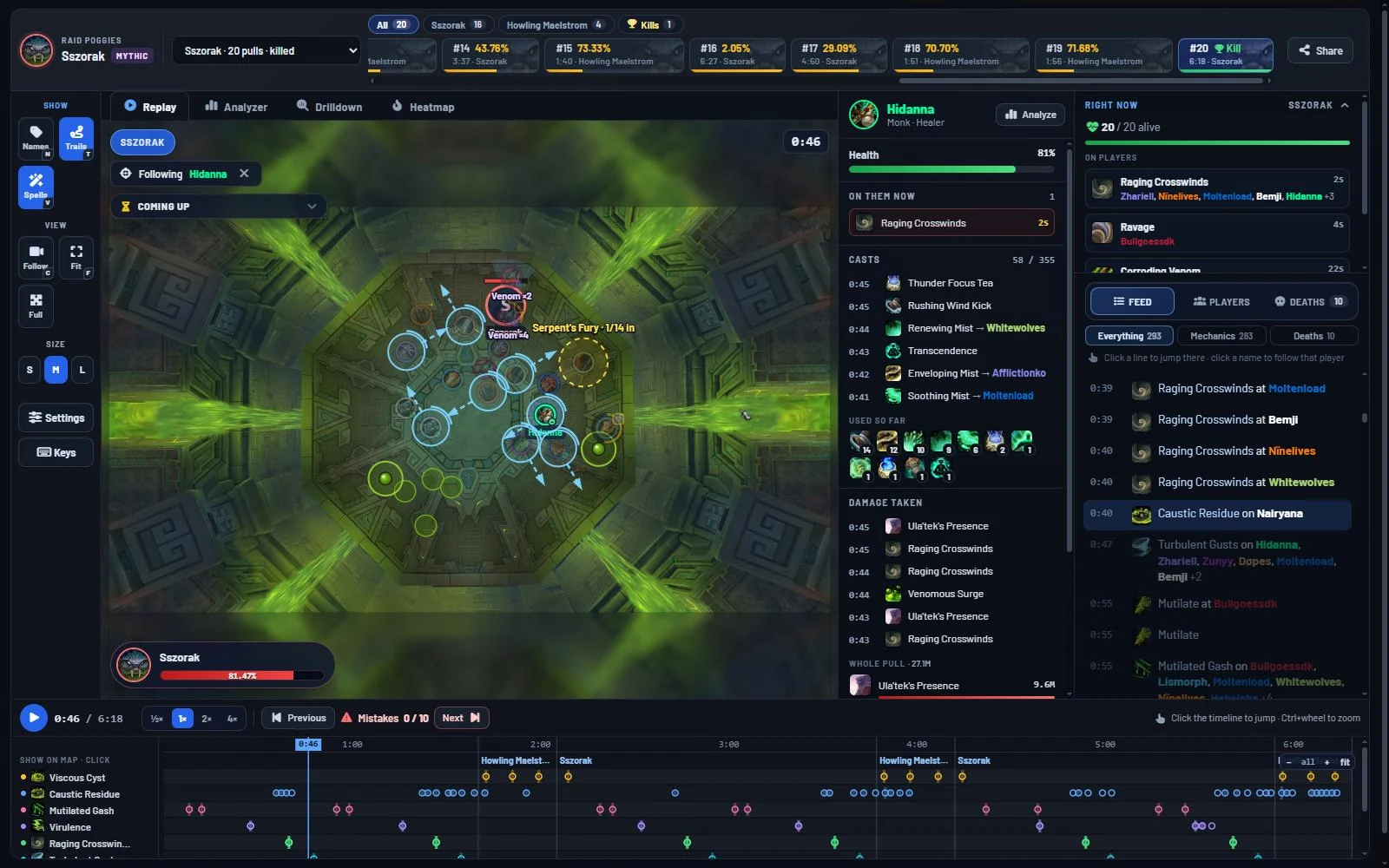
The replay is the centre of it all. Everything that happened in the pull is drawn on the map, second by second.
- Players, bosses and adds move as they did, with trails, names, health bars, role markers and a facing cone.
- Boss abilities are drawn where they landed, with cast bars on the boss and adds.
- Raid tools show up where they were used: Spirit Link, Anti-Magic Zone, Power Word: Barrier, Darkness, Demonic Gateway jumps, kicks, stuns, grips and knockbacks.
- Defensives show a gold ring on the player who pressed one.
- Your raid note can be pasted in, and its timed lines pop up as the fight plays.
Find the moment that matters
The feed on the side lists deaths, defensives and mechanics as they happen. The timeline at the bottom gives every boss cast its own row. Click a line or a mark and the replay jumps there. Press [ and ] to go from one mistake to the next, and skip the minutes where nothing went wrong.
Follow one player
Click any player to follow them with the camera and see their health, buffs, debuffs, casts and what hit them, live as the fight plays. Fade out everyone else if you only care about one person.
Make it yours
Play at ½×, 1×, 2× or 4×. Zoom and turn the map. In Settings (S) you can turn off anything you don't need, change trail length, show who hits what, hide spells from the timeline and drop your own raid markers.
The WoW log analyzer: every tab explained
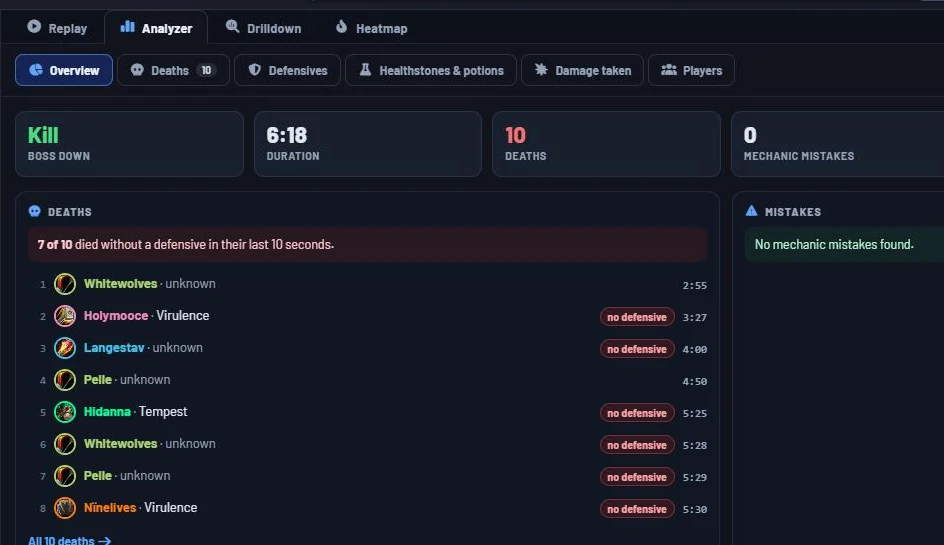
Next to the replay sits the Analyzer, a full breakdown of the pull. Every tab can be filtered by role, phase and player, and most lists can be shown as a table or as cards. Click any time in the Analyzer and you're watching that moment in the replay.
Overview
A board of widgets you arrange yourself: raid health and deaths over the pull, top damage and healing, damage taken per player, phases, defensive usage, mistakes and more. Start from a template (Default, Progression, Performance or Healers), then drag widgets around and save your own layout.
Offensive
Damage per player and per target, and how each player used their damage cooldowns. See whether big cooldowns lined up with burn windows or were spent on nothing.
Defensive
Personal, external and raid defensives per player. Pick a player to see their cooldowns on a timeline: when a defensive was ready and not pressed, every time they dropped below 35% health, and every time they fell under 15% with a healthstone or potion still in their bags.
Healing
Healing per player and when each healing cooldown was used, so you can compare your cooldown plan to what actually happened.
Damage taken
Who took the most damage and from which ability. Avoidable damage stands out right away.
Consumables
Healthstones, health potions and combat potions per player, and when they were used.
Utility
Its own tabs for interrupts, dispels, crowd control, grips and knocks, movement and raid utility. Rankings per player, what was interrupted or removed and by whom, and every use in order.
Deaths
Every death in order with a health graph and the last 10 seconds before it: what hit them, how fast it went, and which defensives, externals and potions were used. Show only deaths without a defensive, or hide the deaths after the wipe call.
Players
One row per player with damage taken, defensives, healthstones and potions, mistakes and when they died.
Query
Your own rules, checked on every pull. More about that below.
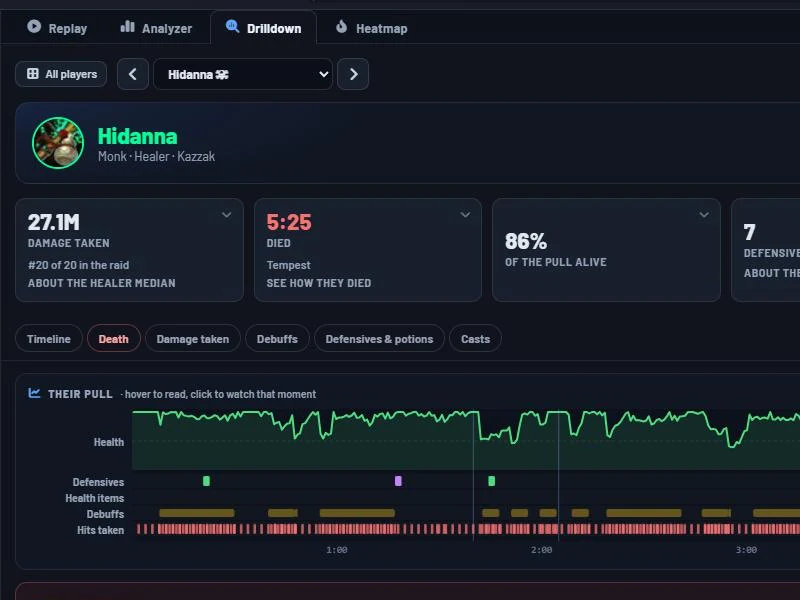
Drilldown: one page per player
Pick a player and go through their whole pull. If they died, Drilldown tells you how in plain words: what killed them, how fast it went, and what they did or didn't press.
- Health, defensives, health items and debuffs on one timeline, with spell icons and Wowhead tooltips.
- Damage taken next to others in the same role, so you see right away who took more than they should.
- Their casts, debuffs and query results.
Hover anywhere to see that moment, click to watch it in the replay.
Healing Heatmap: raid damage against healing cooldowns
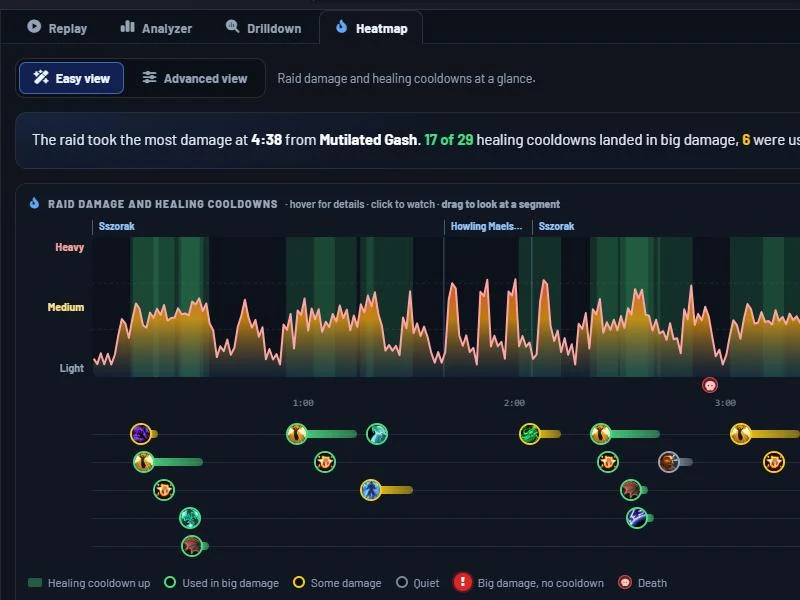
Made for healers. The Heatmap shows raid damage over the whole pull, with every healing cooldown lined up underneath.
- Green means a cooldown landed in a big damage moment.
- Grey means it was used when nothing much was going on.
- A red mark shows big damage where nobody had a cooldown out.
Drag across any part of the fight to zoom in and see damage coming in against healing going out, who did the healing, how much was overheal, how low the raid got and who died. It's the quickest way to fix a healing cooldown plan between pulls.
Query: your own rules on every pull
Every raid has its own things to look out for. A query is a rule you write once, in one sentence, and then see on every pull you open. For example:
- Players hit by a certain ability more than 0 times.
- A debuff that took longer than 2 seconds to dispel.
- Players hit by a tank buster with no defensive in the 5 seconds before.
- Who had a debuff in phase 2.
There are ready-made queries for the current bosses. Show results as a list, a grid, a bar chart, a timeline per player or a chart over the pull. Share a query as one line of text or as a link that opens the pull right on it, so your whole raid looks at the same thing.
Night summary: the whole raid night at once
One pull tells you what went wrong once. The Night summary adds up every pull in a log: how far you got on each boss, who died most and to what, query results, defensive and consumable use, and more. Good for the raid leader's notes after the night, or for spotting the one mechanic that keeps ending your pulls.
Live logs and death videos in Discord
Live logging during raid? Add the Raidstrats bot to your Discord from the Guild page, press Live Log in the Warcraft Logs uploader, and open the log in Log Replay. Raidstrats checks the log every 30 seconds while you pull and stops by itself when you're done.
- The bot posts every pull, only kills, only close wipes, or only when someone asks with /pull.
- Each post gets a button per death. Press it and the bot posts a short video of the last seconds before that player died.
- The guild master decides which ranks can run the bot and start live logs.
Death videos: 40 per night and 120 per month on Heroic Raider and up, 75 per night and 250 per month on the Guild Tier. A video that's already been made doesn't count again.
Log Replay and Warcraft Logs
Log Replay doesn't replace Warcraft Logs, it builds on it. You still upload your logs to Warcraft Logs as usual. Log Replay reads the report through your Warcraft Logs account and adds what tables can't show.
| Warcraft Logs | Raidstrats Log Replay | |
|---|---|---|
| Where the log lives | Uploads, stores and ranks your logs | Reads them from Warcraft Logs |
| Positions | Replay of positions | Full boss map with mechanics, raid tools, cast bars and your raid note |
| Deaths | Death recap per player | Last 10 seconds with health graph, defensives and potions, plus a video |
| Rules | Custom queries in the expression editor | Queries in plain sentences, shared as text or a link |
| During raid | Live logging | Pull posts and death videos in your Discord |
| Damage and healing | Some damage left out depending on different factors | Raw damage and healing |
Because we show raw damage to enemies and raw healing, our numbers can be higher than the ones on Warcraft Logs. Rankings and parses stay on Warcraft Logs.
Supported raids and bosses
Log Replay supports the current raid, The Venomous Abyss, on every difficulty. Each boss has its own map and its own mechanics drawn on it.
- Sszorak
- The Twin Fangs
- The Coiled Altar
- Entombed Sentinels
- Vashnik the Malignant
- Nek'zali the Soulcoiler
- Ula'tek
- The Lost Explorers
Dungeons and Mythic+ runs aren't supported. Spot a mechanic that isn't drawn yet? Press Help us in the replay and tell us how it works.
Price
Watching: free
Anyone can watch a pull that's already been loaded, from a shared link or an embed. No account needed. That includes the Analyzer, Drilldown and Heatmap.
Loading your logs
Loading new pulls from your own logs, live logs and death videos need Heroic Raider or higher on Patreon.
Questions
What is a WoW log replay?
A log replay takes a World of Warcraft combat log uploaded to Warcraft Logs and plays the fight back on the boss map: where every player stood, what the boss cast, and who got hit, second by second.
Is Log Replay free?
Watching is free and needs no account. Anyone with a link can watch a pull that has been loaded. Loading new pulls from your own logs needs Heroic Raider or higher on the Raidstrats Patreon.
Does it work with private Warcraft Logs reports?
Yes. Pulls are loaded through your own Warcraft Logs account, and a private log can only be watched by you and your guild.
Which raids are supported?
The current raid, The Venomous Abyss: Sszorak, The Twin Fangs, The Coiled Altar, Entombed Sentinels, Vashnik the Malignant, Nek'zali the Soulcoiler, Ula'tek and The Lost Explorers. Dungeons and Mythic+ runs are not supported.
Can I replay a live log while we raid?
Yes. Start Live Log in the Warcraft Logs uploader and open the log in Log Replay. Raidstrats checks it every 30 seconds and can post each pull in your Discord, with a death video button for every death.
Why are damage and healing numbers different from Warcraft Logs?
Log Replay shows raw damage to enemies and raw healing. Warcraft Logs leaves some damage out depending on different factors, so our numbers can be higher.
Can I put a replay on my own website or in a raid plan?
Yes. Every pull has an embed code for any site that takes an iframe, and the Raidstrats planner has a Video object that plays part of a pull inside your raid plan.
Do I need to install anything?
No. Log Replay runs in your browser. There is no addon or program to install.